
Sign-up requirements
- Chinese mobile verification
- Platform app account needed Source ↗ 2026.11.12
- Chinese business licence (营业执照)
- Not verified
- Sign-up as a Korean business
- Not verified
- Access from abroad
- Opened from a Korean IP
Free and paid scope
- Free tier
- Not verified Source ↗ 2026.11.12
- Paid plans
- See the official price list
Data export
- Excel
- Not verified
- CSV
- Not verified
- Download (format not stated)
- Not verified
- API
- Not verified
- Automatic reports
- Not verified
CMB shows only values confirmed on official sign-up pages, help pages or price lists. Anything else is marked 'Not verified'. The access item is not an official statement and can vary by network.
1-minute tutorial
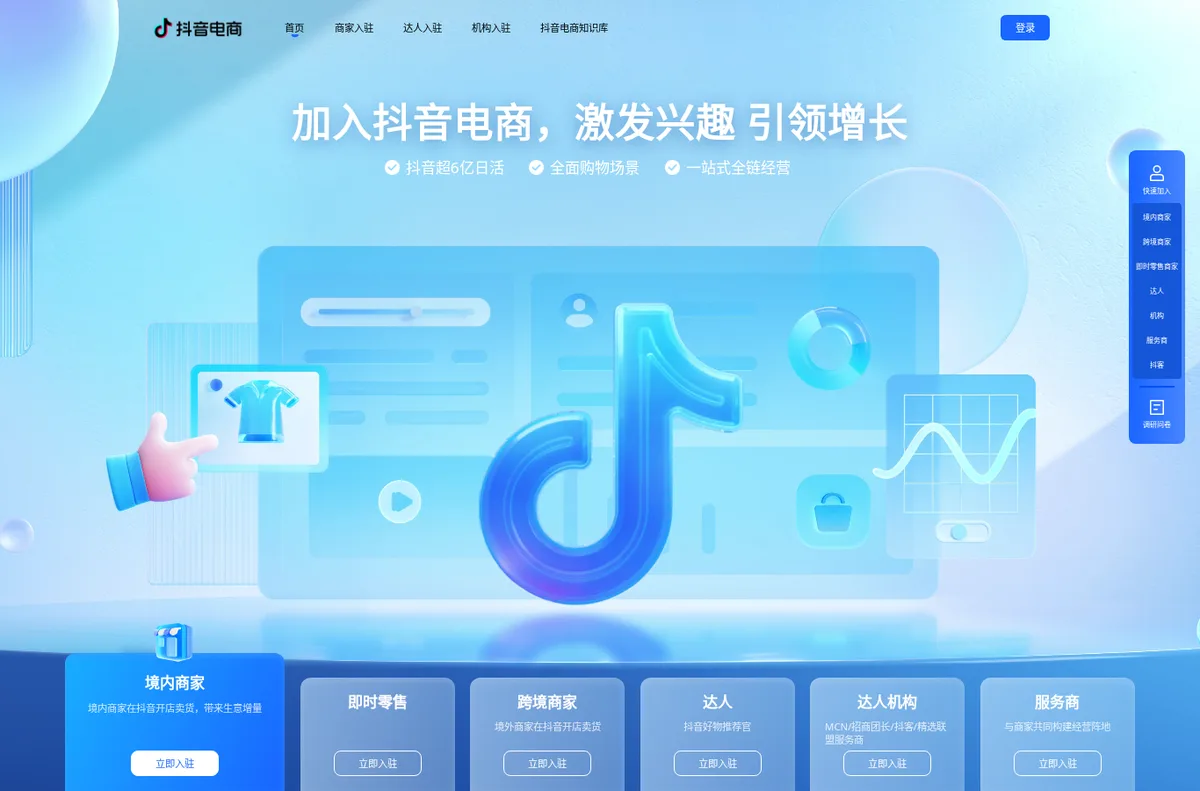
Public screen, before login · captured by CMB 2026.11.26 1Choosing your entry (立即入驻)
At the bottom of the Douyin e-commerce (抖音电商) home page, each role has a card: 境内商家 (mainland sellers), 即时零售 (instant retail), 跨境商家 (「境外商家在抖音开店卖货」), 达人 (creators), 达人机构 (MCNs and agencies) and 服务商 (service providers). Click 「立即入驻」 on your card; existing users use 「登录」 at the top right.
Screens may change. Screens behind login are not shown.

Douyin · Official tool
Baiying 巨量百应
Baiying is Douyin’s official platform connecting sellers, creators and agencies for product collaboration and affiliate commerce.
01 · Overview
Platform overview
Ocean Engine Baiying connects sellers and creators for product selection and sales collaborations. Unlike 星图, which focuses on commissioning brand content, Baiying supports collaborations involving product sales and commissions.
Baiying at a glance: official address, login, overseas sellers and where fees appear
The Baiying (巨量百应) login page is titled “抖音电商百应”. The footer of the Douyin e-commerce home and onboarding pages names the operator as 上海格物致品网络科技有限公司 (14 November 2026).
| Item | What the official screens show |
|---|---|
| Official address | buyin.jinritemai.com. The root address redirects to the Douyin e-commerce home, http://www.douyinec.com. The login page is https://buyin.jinritemai.com/mpa/account/login |
| Login method | The “扫码登录” screen: scan the QR code with the Douyin app or sign in with a Douyin phone number (“打开 抖音App 扫码登录或使用 抖音手机号登录”). A separate “其他登录方式” (other login methods) option is shown |
| Entry by role | In the “登录” menu on http://www.douyinec.com, 达人工作台 (creators), 达人机构工作台 (creator agencies) and 抖客工作台 lead to Baiying screens. 商家工作台 (merchants) leads to the Douyin shop back end at fxg.jinritemai.com |
| Overseas companies and phone numbers | The creator and agency onboarding pages state no condition for overseas companies or non-Chinese phone numbers. The overseas-seller entry “跨境商家” (“境外商家在抖音开店卖货”) leads to Douyin EC Global (抖音电商全球购, b.guantou.com) |
| Where fees appear | The creator and agency pages show no platform fee table, and sales commissions follow each product’s terms. Onboarding documents and fees for overseas sellers are on the Global “资质资费” page (https://b.guantou.com/fee) |
- The “资质资费” page (default view: 企业 and 品牌旗舰店) says under “境外主体资质” that the shop-opening company must be an entity outside mainland China, including Hong Kong, Macao or Taiwan (14 November 2026).
- The same view lists mainland-company documents under “境内主体资质”. Its “境外电商企业与境内代理企业委托合作声明” item requires one mainland Chinese company to act as joint guarantor.
02 · Features
Main features and applications
01
Product collaboration
Sellers prepare product-collaboration and sales terms.
02
Creator and institution connection
Manage product selection and collaboration contact points by role.
03
Affiliate-sales operations (分销)
Link collaboration terms and sales results to operational tasks.
03 · Applications
Who it serves and how to use it
For Douyin merchants, brands and commerce creators expanding product distribution through creator sales channels.
Before using the results
| Task to define | Creator-commerce (带货) matching |
|---|---|
| Interpretation limit | Negotiating candidates becomes easier if you first organize the margin and commission conditions of the product to be sold. |
04 · Workflow
A practical workflow
This is a typical workflow. Check current menus and permissions on the official screens.
- 1Review product/margin
- 2Set collaboration conditions
- 3Connect candidates
- 4Operate product/collaboration
- 5Confirm order/commission
Decide whether you are acting as a seller, a creator (达人) or an institution (机构).
Overseas sellers should check the separate 跨境商家 route on the official site.
Confirm the address is buyin.jinritemai.com (it currently redirects to the Douyin e-commerce home, https://www.douyinec.com) or the official Douyin e-commerce onboarding page for your role. https://buyin.jinritemai.com
Creators follow the official 达人 steps: open commerce permission, add 精选联盟 products to the showcase, then attach them to videos or live sessions.
Institutions submit qualifications, supporting documents and legal-representative information, then complete review and sign the onboarding agreement.
Check commissions against each product’s terms, separately from content-production costs.
The official creator page lists three steps: open commerce permission, add products to the showcase, and sell in video or live sessions. The official institution page says qualification review takes 5–10 business days, after which you sign the onboarding agreement. These pages were checked on 13 November 2026.
Unlike Xingtu (巨量星图), which focuses on commissioning brand content, Baiying is for product sales (带货) and affiliate distribution (分销). There is no single public platform fee table. Product commissions follow each listing’s terms.
This is a typical workflow. Check current menus and permissions in the service itself.
What to prepare and retain
Distinguish seller and creator roles before documenting products, commissions, content and selling terms. Manage partner discovery separately from transactions and settlement.
Check supply, delivery and cancellation conditions and the creator’s scope of work against the collaboration terms.
These preparation steps are not promises of product access or campaign performance.
05 · Conditions
Access and costs
| Account & access | Check accounts and product selling permissions for each role, such as seller, creator, or institution. |
|---|---|
| Costs & coverage | Check and budget product commissions and transaction/service charges separately from content production costs. |
What to prepare
Follow the official materials for your role.
| Item | Detail | Source |
|---|---|---|
| Creators | Douyin account, commerce permission, 精选联盟 products in the showcase | Official 达人 page, checked 13 November 2026 |
| Institutions | Qualifications, documents, legal-representative information; review in 5–10 business days; sign the agreement | Official 机构 page, same day |
| Sellers | Official merchant onboarding; overseas sellers use the 跨境商家 route | Official Douyin e-commerce home, same day |
| Cost | No public platform fee table. Commissions are set per product | Public pages, same day |
Document supply, delivery, cancellation and commission terms before you start outreach.
When you read the results
- Treat partner discovery and actual orders or settlement as separate steps.
- This guide does not promise approval or sales results.
Reading Baiying’s screens: workbenches and menus by role
The official onboarding pages describe each role’s screens as follows (14 November 2026). Menu labels after login follow the account screens.
| Role | Name on the official page | Functions the official page lists |
|---|---|---|
| Creator (达人) | “抖音好物推荐官”, 达人工作台 | 个人橱窗展示 (a personal showcase of chosen products), 短视频带货 (selling in short videos), 直播带货 (selling in livestreams), 带货 PC 中控台 (a PC console for video and live selling) |
| Creator start, three steps | “3 步解锁达人带货” | Open e-commerce permission (电商权限) → add 精选联盟 products to the personal showcase → attach products to the cart in a video or livestream |
| Agency (达人机构) | After login, a role screen offers “MCN机构” and “招商团长” | 达人管理 (bulk creator management), 商家管理 (bulk management of Douyin shops), 数据参谋 (tracking creator and shop livestream performance), 撮合提效 (product and creator recruitment tools) |
| Agency onboarding flow | “入驻流程” | Enter qualification details (qualifications, documents, agency legal-representative information) → review in 5–10 working days → approval → sign the onboarding agreement |
| Merchant (商家) | 商家工作台 | Leads to the Douyin shop back end login (fxg.jinritemai.com), not to Baiying |
- The agency role screen is headed “欢迎来到精选联盟”. The creator page describes 精选联盟 as the place where creators add products to their personal showcase in one click (“精选联盟提供海量优质商品一键添加至个人橱窗”).
- The login page slogan is “轻松带货赚佣金”. A creator earns sales commission (佣金), and the commission terms are set per product.
- 抖客工作台 has its own login route, and the public onboarding pages do not describe its functions.
06 · Guides
Guides & articles
Ocean Engine and Douyin e-commerce tools map
These CMB pages cover the Douyin tools used alongside Baiying. Each row follows the live CMB tool page for that product (14 November 2026).
| Tool | Official address on its CMB page | Role described on its CMB page |
|---|---|---|
| Baiying (this page) | buyin.jinritemai.com | Douyin’s official platform connecting sellers, creators and agencies for product collaboration and affiliate commerce |
| Ocean Engine (巨量引擎) | http://www.oceanengine.com | Official advertising and marketing solutions across ByteDance media, including Douyin |
| Qianchuan (巨量千川) | qianchuan.jinritemai.com | Douyin’s official e-commerce advertising platform for promoting products and livestream sales |
| Xingtu (巨量星图) | http://www.xingtu.cn | Douyin’s official marketing platform for finding creators, arranging content collaborations and measuring results |
| Yuntu (巨量云图) | yuntu.oceanengine.com | ByteDance’s official platform for analysing brand audience assets and marketing effectiveness |
| Douyin Index (抖音指数), formerly Ocean Engine Trend Insight (巨量算数) | creator.douyin.com (Douyin Creator Center) | Keyword and brand search indices, related terms and audience distribution |
| Douyin E-commerce Compass (抖音电商罗盘) | compass.jinritemai.com | An official data product for analysing store, brand and commerce-creator operations |
- On these CMB pages, Xingtu covers commissioned brand content, Baiying covers product-sales (带货) and affiliate (分销) collaborations, and Qianchuan covers product and livestream ads.
- The “关联平台” list in the footer of the Douyin e-commerce home includes 巨量引擎 (www.oceanengine.com).
- Douyin’s marketing tools are summarised in Douyin overview: official user figures, marketing tools and where to get official data (19 October 2026).
- Douyin EC Global sales are covered in Douyin cross-border 11.11 sales up 27%; 91 overseas brands pass RMB 10 million (10 November 2026).
Frequently asked questions
What is Baiying?
Baiying is Douyin’s official platform connecting sellers, creators and institutions for product sales (带货) and affiliate distribution (分销). It is not the same as Xingtu (巨量星图), which focuses on commissioning brand content.
How do I sign up or log in?
Open buyin.jinritemai.com and the official page for your role. Creators open commerce permission; institutions submit qualifications and wait for review.
How long does institution review take?
Confirm the current timeline on the official screen.
How much does it cost?
Product commissions follow each listing’s terms and should be budgeted separately from content-production costs.
Who is it for?
Douyin merchants, brands, commerce creators and institutions that sell through creator channels.
Can an overseas company use Baiying?
Baiying’s creator and agency onboarding pages state no condition for overseas companies or non-Chinese phone numbers. The overseas-seller entry “跨境商家” on the Douyin e-commerce home leads to Douyin EC Global (b.guantou.com). Its “资质资费” page requires the shop-opening company to be outside mainland China and names one mainland company as joint guarantor.
What does the Baiying login page offer?
The login page at buyin.jinritemai.com/mpa/account/login is titled “抖音电商百应”. Its “扫码登录” screen offers a QR-code scan with the Douyin app or a Douyin phone-number login, with a separate “其他登录方式” option. Merchants use 商家工作台, which leads to the Douyin shop back end at fxg.jinritemai.com.
Latest briefs mentioning this tool
Need this applied to your own brand?
Brand-specific reviews (search presence, competitor comparison and channel checks) are a separate advisory service based on verified data.
View advisory scope →Compare
Other Douyin tools
- Chanmama 蝉妈妈 Douyin Livestream Commerce Data Tool
- Daduoduo 达多多 Douyin Creator & Sales Data Tool
- Douchacha 抖查查 Douyin Livestream & Product Data Tool
- Douyin Creator Center 抖音创作者中心 Douyin Creator Center
- Douyin E-commerce Compass 抖音电商罗盘 Douyin E-commerce Data Platform
- Douyin Laike 抖音来客 Douyin Local Merchant Platform
07 · Sources
Sources and references
- Official product and service information ↗ buyin.jinritemai.com
Sources reviewed: public official product information and help · Review date 2026.10.04
CMB has not reviewed members-only data or tested campaign performance firsthand.
- https://buyin.douyinec.com/daren (creator onboarding, checked the same day)
- https://buyin.douyinec.com/darenmcn (institution onboarding, checked the same day)