
Sign-up requirements
- Chinese mobile verification
- Not verified
- Chinese business licence (营业执照)
- Required (official) Source ↗ 2026.11.12
- Sign-up as a Korean business
- Not verified
- Access from abroad
- Opened from a Korean IP
Free and paid scope
- Free tier
- Prepaid ad spend Source ↗ 2026.11.12
- Paid plans
- 最低充值 minimum top-up RMB 1,000 Source ↗ 2026.11.12
Data export
- Excel
- Not verified
- CSV
- Not verified
- Download (format not stated)
- Not verified
- API
- Yes Source ↗ 2026.11.27
- Automatic reports
- Not verified
CMB shows only values confirmed on official sign-up pages, help pages or price lists. Anything else is marked 'Not verified'. The access item is not an official statement and can vary by network.
1-minute tutorial
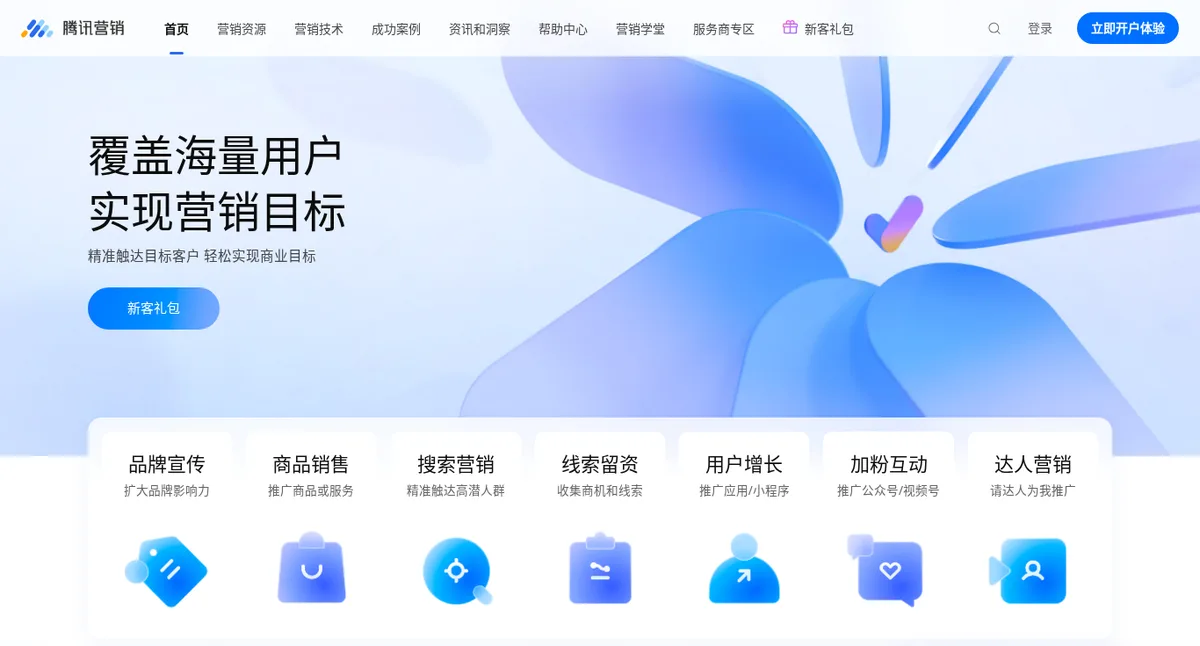
Public screen, before login · captured by CMB 2026.11.26 1Choosing an ad goal (营销目标)
The Tencent Ads (腾讯营销) home page sorts goals into seven cards: 品牌宣传 (brand), 商品销售 (product sales), 搜索营销 (search), 线索留资 (leads), 用户增长 (apps and mini programs), 加粉互动 (official accounts and Channels) and 达人营销 (creators). Account opening starts from 「立即开户体验」 at the top right.
Screens may change. Screens behind login are not shown.

WeChat · Official tool
Tencent Ads 腾讯广告
Tencent Ads is the official platform for placing and measuring advertising on WeChat, QQ and other Tencent media.
01 · Overview
Platform overview
Tencent Ads lets advertisers select media and creatives for objectives such as branding, app use and customer acquisition. Set up conversion-data connections and reporting before launch so you can examine customer actions after exposure.
02 · Features
Main features and applications
01
Media advertisement
Review advertising options on WeChat, QQ and other Tencent media.
02
Goal and material operation
Manage audiences, creatives and budgets against your advertising objective.
03
Performance and data connection
Track impressions, clicks and target actions in campaign reports.
03 · Applications
Who it serves and how to use it
For advertisers planning and measuring campaigns across Tencent media.
Before using the results
| Task to define | Ad campaigns on WeChat and QQ |
|---|---|
| Interpretation limit | Having your conversion path and metrics ready before your ad launches makes it easier to evaluate post-click performance. |
04 · Workflow
A practical workflow
- 1Select target/media
- 2Check account/qualification
- 3Prepare landing/conversion measurement
- 4Execute advertisement
- 5Analyze results
This is a typical workflow. Check current menus and permissions in the service itself.
What to prepare and retain
Specify the media, placement, objective, creative and conversion-measurement approach. Availability and advertiser requirements can differ across Tencent advertising products.
Align periods and attribution conditions when comparing campaigns, and distinguish reported advertising outcomes from customer-management and revenue records.
These preparation steps are not promises of product access or campaign performance.
05 · Conditions
Access and costs
| Account & access | Confirm advertiser or service-provider account eligibility, business-category requirements and integration permissions. |
|---|---|
| Costs & coverage | Distinguish between advertising media costs and production, agency, and data connection costs. |
06 · Guides
Guides & articles
How to use it
This is a typical workflow. Check the labels on the official screens.
- Select the objective and media, then check the account and qualifications.
- Open the official site only after the host is e.qq.com: https://e.qq.com. The ads guide is at https://e.qq.com/ads/.
- For self-service registration to promote a web link, the official Tencent Ads FAQ on account opening (https://tencentads.com/Faqlist/Detail/614, checked 13 November 2026) sets out these routes:
- On the website: go to e.qq.com, click Register (注册) at the top right, fill in basic information, then link a QQ number. The FAQ says to avoid using a personal QQ number. Then complete the information in the ads manager and wait for manual review.
- If the application is refused, follow the reason shown on screen and resubmit.
- Via the official account: follow “Tencent Ads Service” (腾讯广告服务号), choose “I want to open an account”, fill in basic information, link a non-personal QQ number, complete the information and wait for review. After approval, campaigns are managed on the PC platform, the FAQ says.
- To promote a PC or mobile Android app, the same FAQ says to open an account on the Tencent Open Platform (open.qq.com), upload the app, then sign in to Tencent Ads with the developer account.
- Prepare the landing page and conversion measurement, run the ads, then analyse the results.
Access can vary by network.
Official FAQ 245 and 617 say enterprise account opening requires a business licence (or equivalent qualification), a copy of the legal representative’s ID, special-industry qualifications where applicable, and an ICP filing capture when a first-party domain is used.
What to prepare
Use the fields shown on the official screens.
| Item | What official FAQ pages say | Source |
|---|---|---|
| Official site | Register at e.qq.com | FAQ 614, checked 13 November 2026 |
| QQ number | Avoid a personal number | Same FAQ |
| Minimum top-up | The minimum top-up is RMB 1,000 for both a new account and a later top-up (续费). Upper limits vary by method | Official FAQ “Top-up limits”, https://tencentads.com/Faqlist/Detail/626, checked 13 November 2026 |
| Conversion measurement | Have the conversion path and metrics ready before launch, so results after the click can be assessed | Tool-page caution |
How to read costs and results
Distinguish media spend (top-ups and delivery) from production, agency and data-connection costs.
Official FAQ 626 states a minimum top-up of RMB 1,000 for both opening an account and later top-ups. The same FAQ says the Tenpay (财付通) upper limit follows the advertiser’s bank-card limit.
WeChat QR payment in the manager supports a maximum of RMB 50,000, also subject to the advertiser’s bank limit. That bank limit can be lower than RMB 50,000 at some banks.
A platform guide does not by itself guarantee campaign results.
Related tools and briefings
- WeChat Index
- WeChat Ads vs Tencent Ads: how the two official sites fit together (3 November 2026)
- How to check a Chinese ad agency’s official status (20 October 2026)
- WeChat overview (19 October 2026)
Official sources
- Official Tencent Ads FAQ (tencentads.com, operated by 深圳市腾讯计算机系统有限公司)
- https://e.qq.com and https://e.qq.com/ads/
- https://tencentads.com/Faqlist/Detail/614 (account-opening steps)
- https://tencentads.com/Faqlist/Detail/626 (top-up limits)
- https://tencentads.com/Faqlist/Detail/245 and https://tencentads.com/Faqlist/Detail/617 (supporting documents, opened 13 November 2026)
- https://tencentads.com/l/privacy (operator statement)
Latest briefs mentioning this tool
Related reports
Frequently asked questions
What is Tencent Ads?
Tencent Ads is the official platform for placing and measuring advertising on WeChat, QQ and other Tencent media. The official address is e.qq.com.
How do I log in to or sign up for Tencent Ads?
Official FAQ 614 describes two self-service web-link routes: register at e.qq.com, or use “I want to open an account” (我要开户) in the Tencent Ads Service official account, and both say to avoid a personal QQ number. For app ads, open an account on the Tencent open platform (open.qq.com) and sign in with the developer account.
How much does Tencent Ads cost?
Official FAQ 626 states that the minimum top-up is RMB 1,000 for both a new account and a later top-up. Upper limits vary by method and are set out in FAQ 626. Production and agency costs are separate.
How do I use Tencent Ads?
A typical order is to select the objective and media, check the account and qualifications, prepare the landing page and conversion measurement, run the ads, then analyse the results. Have the conversion path and metrics ready before launch.
What qualifications are required?
Official FAQ 245 and 617 say enterprise account opening requires a business licence (or equivalent qualification), a copy of the legal representative’s ID, special-industry qualifications where applicable, and an ICP filing capture when a first-party domain is used. FAQ 614 says to avoid linking a personal QQ number.
Who is Tencent Ads for?
It is for advertiser and agency teams that want to run ads on Tencent media such as WeChat and QQ.
Need this applied to your own brand?
Brand-specific reviews (search presence, competitor comparison and channel checks) are a separate advisory service based on verified data.
View advisory scope →Compare
Other WeChat tools
- NewRank 新榜 WeChat & Social Ranking Tool
- Qingbo Intelligence 清博智能 WeChat Account & Social Listening Tool
- WeChat Channels Assistant 视频号助手 WeChat Channels Creator Tool
- WeChat Index 微信指数 WeChat Keyword Trend Tool
- WeChat Official Accounts Platform 微信公众平台 WeChat Official Account Platform
- WeChat Open Platform 微信开放平台 WeChat Open Platform
07 · Sources
Sources and references
- Official product and service information ↗ e.qq.com
- Official help/reference material ↗ hiflow.tencent.com
Sources reviewed: public official product information and help · Review date 2026.10.04
CMB has not reviewed members-only data or tested campaign performance firsthand.